Here’s a day almost everyone has had. Your calendar says you have a 10am stand-up, a 2pm review and a 4:30 call. Your to-do list says you have six things to do. Both are accurate. Both are, individually, a reasonable plan.
Together they are a lie, and you find out at about 5pm.
Nothing went wrong, exactly. You just made a plan in two places that don’t know about each other, and no amount of discipline reconciles them, because the reconciliation is arithmetic and it has to happen at the moment you commit, not at the moment you fail.
Why two systems is the default
There’s a good reason almost everyone lives this way: meetings and tasks genuinely are different things.
A meeting has a fixed time and other people in it. It happens at 2pm whether you’re ready or not, and you can’t do it at 2:40 because it felt like a better moment. It’s a commitment to someone else.
A task has a size but no time. “Write the summary” takes forty minutes, and those forty minutes could be almost anywhere. It’s a commitment to yourself, and it is infinitely negotiable, which is exactly why it keeps losing.
So they live in different apps. Calendar for the fixed things, list for the negotiable things. Fine. Except your day only has one supply of hours, and both apps are quietly spending it.
Why this hits ADHD brains harder
For a neurotypical planner, the gap between calendar and list is an annoyance that a bit of mental arithmetic covers.
For an ADHD brain it’s a trap, for three reasons that compound.
Time blindness means the arithmetic doesn’t happen. The core symptom isn’t laziness about planning, it’s that durations don’t feel like anything. Six tasks look like six tasks. Three meetings look like three meetings. Neither reads as “your entire day, plus ninety minutes you don’t have”. The one operation that would save you is the one your brain won’t perform unprompted. (More on this in time blindness, explained.)
Meetings destroy more than their length. A 30-minute call in the middle of the afternoon does not cost 30 minutes. It costs the 30 minutes, plus the ramp-down before it because starting anything deep would be pointless, plus the re-entry after. For a brain where task initiation is already the bottleneck, a meeting at 2pm can flatten 1pm to 3pm. A calendar shows the block. It never shows the crater.
The failure arrives as shame, not information. At 5pm you haven’t finished, and the story your brain reaches for is not “I committed to nine hours of things in a seven hour day”. It’s “I wasted the day again”. That’s the part that makes people abandon planning systems altogether: not the missed tasks, but what missing them seems to say about you. A plan that was arithmetically impossible at 9am is not a character flaw, but it feels like one, because nothing ever showed you it was impossible.
The obvious fix, and why it backfires
So: put the meetings in the to-do app. Import calendar events as tasks, and now one screen has everything.
This is what a lot of apps do. It’s what Set did until version 4, and I want to be straight about that, because getting it wrong taught me why it’s wrong.
Turning an event into a task means copying it. Now the same meeting exists twice, in two databases, with two independent lifetimes. Everything after that is a consequence:
- Duplicates. Two devices import the same event and neither can prove they’re the same thing. You now have two 2pm reviews and no idea which is real.
- Deletions that don’t stick, or worse, deletions that stick too well. Tick the imported meeting off in your task app and what should happen to the actual event in your actual calendar that your actual colleague is attending?
- Edits that fight. Move the copy, and the original snaps it back on the next sync. Move the original, and now which one is right?
- A completion model that makes no sense. You don’t complete a meeting. It happens to you. Giving it a checkbox invites your task app to treat it as work you owe, which is precisely backwards.
Every one of these is a bug report I have actually read. And they all trace to one decision: treating a fixed commitment as a negotiable one, because that was the only shape the app had.
What the fix actually looks like
The insight is that you don’t need your meetings to be tasks. You need your tasks to know about your meetings.
Those are very different requirements, and only the first one requires copying anything.
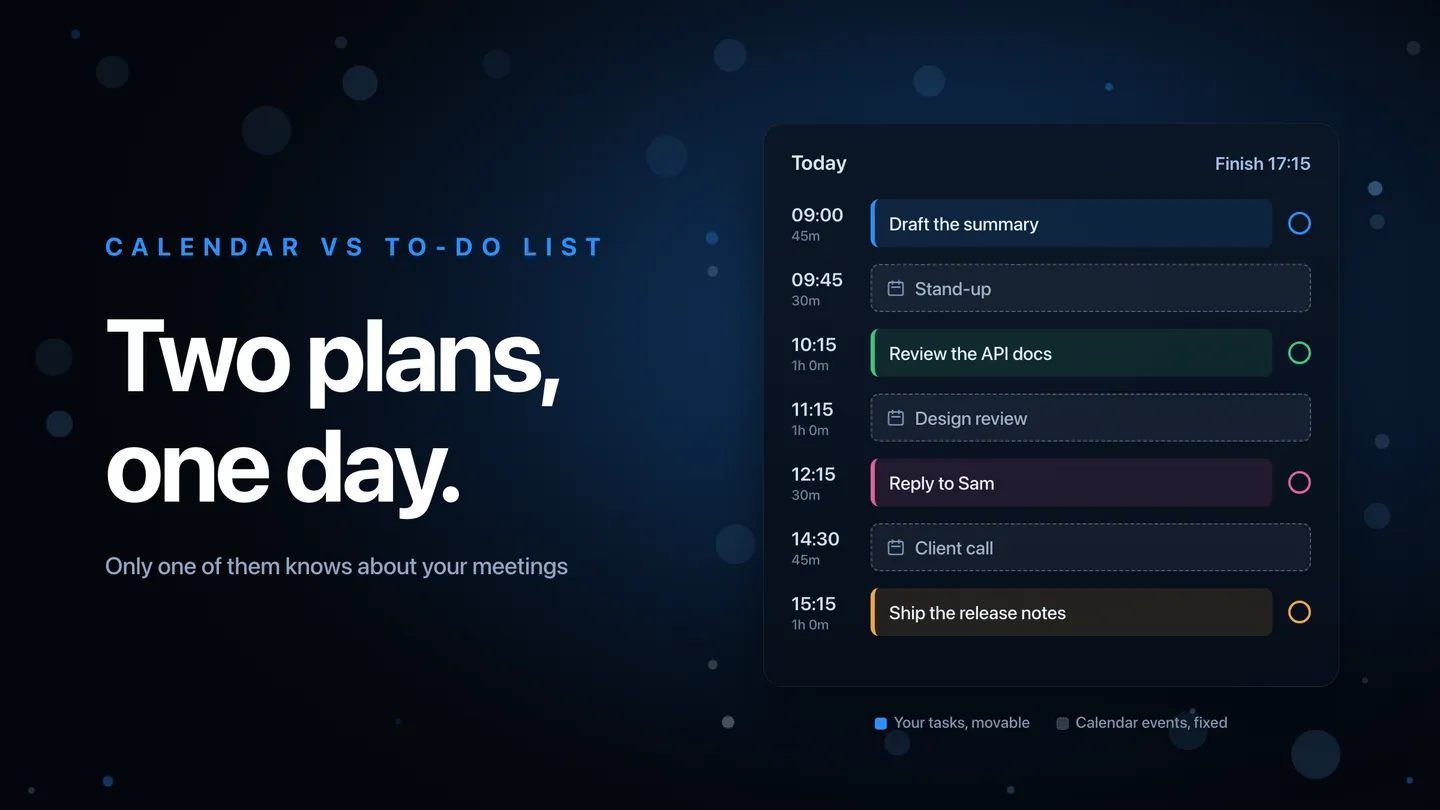
In Set 4, events from the calendars you choose appear in Today as their own rows, at their real times, sitting in the timeline among your tasks. Nothing is written to Set’s database or to iCloud for them. There is no copy, so there is nothing to duplicate, nothing to fall out of sync, and nothing to delete by accident. They are simply drawn where they belong.
They stay recognisably not-tasks: no completion circle, quieter styling, dimmed once they’ve passed. You cannot tick off a meeting because ticking off a meeting is not a thing.
What changes is everything downstream. When Set works out when your day finishes, the meetings are in the maths. Press Reschedule and your tasks flow into the gaps between them. Drag a task by hand and it steps around them. If the afternoon is three calls, the finish time it shows you accounts for three calls, this morning, before you commit to anything.
And when the total genuinely doesn’t fit, it says so at the point of commitment: the finish time turns orange with a “2h over” label, and one tap moves the overflow onto the days ahead. That’s the whole trick. Not more discipline. Just the arithmetic, done for you, at the moment it’s still useful.
Events remain fully editable, because sometimes you do want to change one: tap it, change the title, time, length or notes, and it writes straight to your calendar. Skip a meeting that isn’t happening and your tasks move up into the freed time. But those are things you deliberately do to a calendar event, not things that happen to a copy behind your back.
What to do if you don’t use Set
The principle outlives the app, so here it is without the product.
Whatever you use, make one surface show both. Not two tabs, not two apps side by side. One list, in time order, containing your meetings and your intended work together. If your tools can’t do that, a sheet of paper each morning with the meetings written in and the gaps filled will beat two perfectly synced apps that never meet.
Add up the hours before you commit, not after. Meetings plus task estimates against hours actually available. Do it once, in the morning, on purpose. It takes ninety seconds and it’s the highest-value ninety seconds of the day.
Give every task a duration, even a wrong one. A task without a size can’t be added up, and a plan you can’t add up is a wish. Your estimates will be optimistic; most people run about 1.5 to 2 times over. Learning your own multiplier is worth more than getting individual guesses right.
Budget the craters, not just the blocks. If a meeting sits in the middle of an afternoon, don’t plan deep work for the twenty minutes either side of it. Put something shallow there deliberately, so the ramp-down is a plan rather than a failure.
When it doesn’t fit, move something on purpose. The alternative isn’t fitting more in, it’s finding out at 5pm. Deciding at 9am which thing slides is the same decision, made while you still have authority over it.
None of this is about working more. It’s about your plan being a true statement rather than an optimistic one, because a plan that’s true is a plan you can trust, and a plan you can trust is one you’ll still be using in three weeks.
Set turns your task list into a timeline that knows what time it is, and from version 4 it knows what’s already in your calendar too. Free to try on iPhone, iPad and Mac, with an Apple Watch app arriving in Set 4.